23 OCT 2025 - We are back! If you have been following us over the last few years, you will know that the last 2 months have been rough. We website was practically not loading. Sorry for the mess. We are back though and everything should run smoothly now. New servers. Updated domains. And new owners. We invite you all to start uploading torrents again!
TORRENT DETAILS
7zSFX_Constructor_v4.3
TORRENT SUMMARY
Status:
All the torrents in this section have been verified by our verification system
На кнопку можно перетаскивать папку проекта или собранный проект 7zSFX, также можно выделить файл или папку и нажать иконку в menu bar.
Интеграция в контекстное меню:
Запускаете программу, переходите в -> Редактор сценария -> Инструменты -> Контекстное меню
В контекстном меню (ПКМ), создаются пункты, для открытия папки проекта в программе и собранных 7z SFX (*.exe).
Примечание: при переносе файла программы в другое место, перестают работать пункты контекстного меню, связанные с программой,
для восстановления, просто запустите программу. (путь к основному файлу запуска изменится на текущий).
Справки:
F1 - вызов файла справки модуля (Общая информация о файле конфигурации).
F2 - вызов файла справки по всем функциям в программе (полное описание всех функции и возможностей программы, и остальных горячих клавишах в программе).
F3 - вызов файла справки с переменными.
Автор справки: KaSpieC 666; vovan1982; Joker-2013; SySh
Функция VIP
1. Подложный архив - скрывает сегмент данных от архиваторов, отображая подложенный архив (пустышки), при открытии его архиватором.
2. Скрыть файлы - скрывает сегмент данных от архиватора. При открытии SFX архиватором, выскочит ошибка, оповещающая, что не удалось открыть файл как архив.
3. Крипто - защита проекта случайным паролем. При открытии SFX архиватором, будет требовать пароль, который не требуется вводить при запуске.
Содержимое вашего проекта, будет защищено от сканирования файлов антивирусами и любопытных пользователей. (шифрование по алгоритму AES-256)
4. Подпись автора - оставить свою подпись, которая будет отображаться в сценарии.
5. Пересборка "чужих" SFX архивов - распаковка SFX архива, для обновления/редактирования файлов, и дальнейшей пересборки "чужого" SFX проекта.
Реакция Virus Total
0/59
Важная информация
Конструктор лишь оболочка, которая автоматизирует сборку 7z SFX архивов.
Основывается на базе модифицированного модуля: Олега Щербакова
Модификация заключается в добавлении в модуль множества параметров и расширение его возможностей.
Изначально автор: Игорь Павлов, создатель лучшего бесплатного архиватора 7-Zip.
Поэтому, если возникают вопросы по скриптам, можете поискать на: ссылка
И там есть еще страничка обсуждения файлов конфигурации: ссылка
Есть тема и на нашем форуме: ссылка
Я как автор оболочки, мало что знаю про написание скриптов, сам учусь.
Моя задача, как и этой темы, улучшать работу 7z SFX Constructor, находить баги программы...
English
7z SFX Constructor - easy to use software for creating and editing 7z SFX self-extracting archives. (Build, compression of one or multiple files into a single executable file: *.exe).
Designed for users without knowledge of principles of assembly 7z SFX configuration files and s, as well as for "advanced", which were previously collected their "handles."
The program is designed so that its use is advisable to not know programming languages.
Also in the program there are tooltips (when you hover the mouse over a particular menu item).
Self-extracting archives (7z SFX) - is a special module containing executable code to decompress, which allows to decompress (to run, delete, and more) files by simply running the file as a normal program. Such files, unlike conventional, do not require a separate program for decompressing them.
What 7z SFX create an archive, you just need to perform three steps
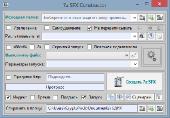
1. Select or drag project folder in the window of program «7z SFX Constructor»
2. Select a performance file
3. Press: Create 7z SFX.
It is the first, initial option.
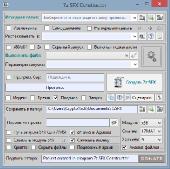
The second option is a little deal with the main window and set up for themselves.
The third advanced, with s (see the FAQ module).
Attention!
Program is provided "as is" without warranty of any kind, express or implied, including all, without exception the implied warranties of merchantability or fitness for any particular purpose.
Capabilities
Unpack the archive to the specified location
Unpack the archive and run the file/s (program, batch file, tweaks, etc.).
Unpack the archive and run a hidden file/s (program, batch file, tweaks, etc.).
Unpacking and running two startup files.
Unpacking and launching executable depending on the bitness of the system.
Unpack the file without launching.
Unpack the archive indicator (progress bar).
Report on the progress bar.
Window select extraction path.
Message after unpacking.
Slip the planted file (it was impossible to view the content).
Put a password to run SFX.
Put the password for the archive (by the curious and Antivirus).
Hide files segment from the archives (you can not open a file).
Overwriting files.
Needless to delete (at the completion of the work program).
Leave your signature in the .
Module selection bit.
Compatible with x64.
Compression Modlie using UPX.
Compression icons, by removing the "big" sketches.
Digital signature of the file.
Integration of the menu Sent.
Integration into the explorer context menu.
Set as buttons in Total Commander.
Require administrator rights (if and sfx-start).
Converter registry files for editing and adding them to SFX .
Customize the appearance of the start-up created by the SFX (menu with a flil deion and checkboxes).
Add shortcuts to any place and in any form (for the setup menu).
Preview dialog of project.
And many others, that greatly simplifies the creation and configuration of your SFX project.
Functions 7z SFX Constructor
editor:
SFX - SFX editing.
Drag and drop files:
- Product file - an executable program file (Label / 7zSFX_Constructor.exe icon) or to the main window, you can drag and drop files directory.
- * .ico Files - when dragging to the main program window * .ico files, the project will be changed SFX icon.
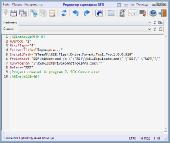
- The SFX projects - while dragging on the main application window (or executable program) "alien" the SFX, will open the scenarios window where you can edit the and collect new the SFX (repackaging scenario). Or save the as a template.
Self-removal - deleting the folder with the unpacked SFX (which is specified in paragraph Unpack c), at the close / exit the program.
Do not overwrite files - files overwrite mode when unpacking. If you start a second copy of the project, the first file is locked and can not be overwritten. The project will give the error window. And if you put a tick in creating, the locked files are not overwritten, and errors will not be.
Unzip the - the way in which to be extracted / unpacked files start with SFX (If you leave the field blank, the extraction will be produced in the% TEMP% "unikalnoe_imya").
Drop-down menu - a choice of variables, which will be unpacking SFX startup, and as a bud is called a folder to unpack.
Help SFX module - call SFX module reference with examples and deion.
Hidden launch - hide console window batch file. Without the program window display at startup.
Run a file - file selection * .exe or batch file, which will be launched after unpacking SFX.
Change Icon - displayed when clicking on the icon, you can specify any other * .exe file with the icon you want to assign your SFX. (Note - SFX to pick up "version / manufacturer / deion / date, etc." from the file, from which was taken the icon). Possible replacement and the icon (* .ico), also, when you hover the cursor will display the path to the name of the startup file (selected in step Run the file).
Progress bar - a word or phrase that will be displayed in the window with the progress bar SFX startup (while unpacking files).
Progress - information Scale create SFX.
Creation time in the name - the time in the title of the collected SFX. Made SFX, will have the title of the exact time of creation (example - WinNTSetup_01-06-47.exe).
Help - display help on the program functions deion.
Password for the project - defined password must be entered when you run SFX.
Password Displays - Display or hide the password dialed in the program window.
Path run SFX - a function necessary for the AMS project.
On behalf of the Admin - created SFX, startup will require Administrator rights.
Compress Icons - removes a resource icons and thumbnails of large (over 48x48).
Compression module SFX - module compresses using UPX, somewhere halving its size.
Module -. Module selection depends on the bit system (If you do not know why this is necessary, then select the X86).
Project file compression settings. You can play around with compression and to find a suitable alternative.
Save - the folder where SFX collected will be stored. If the entered path does not exist, the program will create a folder in the specified directory, if this is not possible, a message will appear notifying (If there is no access to the recording, a warning message appears).
Acknowledgments: for their invaluable contribution to development of program.
Nikzzzz
Kerber
Victor212
Kaspiec 666
Vovan1982
SySh
Special thanks for their help in creation program «7z SFX Constructor» - website: usbtor.ru and its users!