10 JUL 2026 - Back up to full speed! Let's be honest: for the last few months, TorrentFunk was painfully slow. Pages crawled, searches dragged, and just loading the site tested everyone's patience. We hunted the problem down to our network and rebuilt it from the ground up — smarter caching, a much bigger and faster connection, and a lot of fine-tuning under the hood. The difference is night and day: the site now loads in a fraction of a second. No more waiting around. Thanks for sticking with us through the slow spell. Now go discover your funk!
Vista Drive Icon 1.5.0.155+crack
A simple and easy to use software utility designed to help users replace the standard drive icons of their operating system with a Vista-like display
Written by Bogdan Popa on July 3rd, 2012
In case you're still using Windows XP with its default appearance, chances are some interface customizations could come in handy to refresh the looks of this classical operating system.
If the glass and see-through effects don't really appeal to you, there's a more subtle modification you can try by changing the drive icons shown in My Computer. For this purpose you need a dedicated tool to get the job done hassle-free.
Such an application is the one that goes by the name of Vista Drive Icon and will help you replace the traditional drive icons with more modern ones, inspired by the Windows iteration that came right after XP, namely Vista.
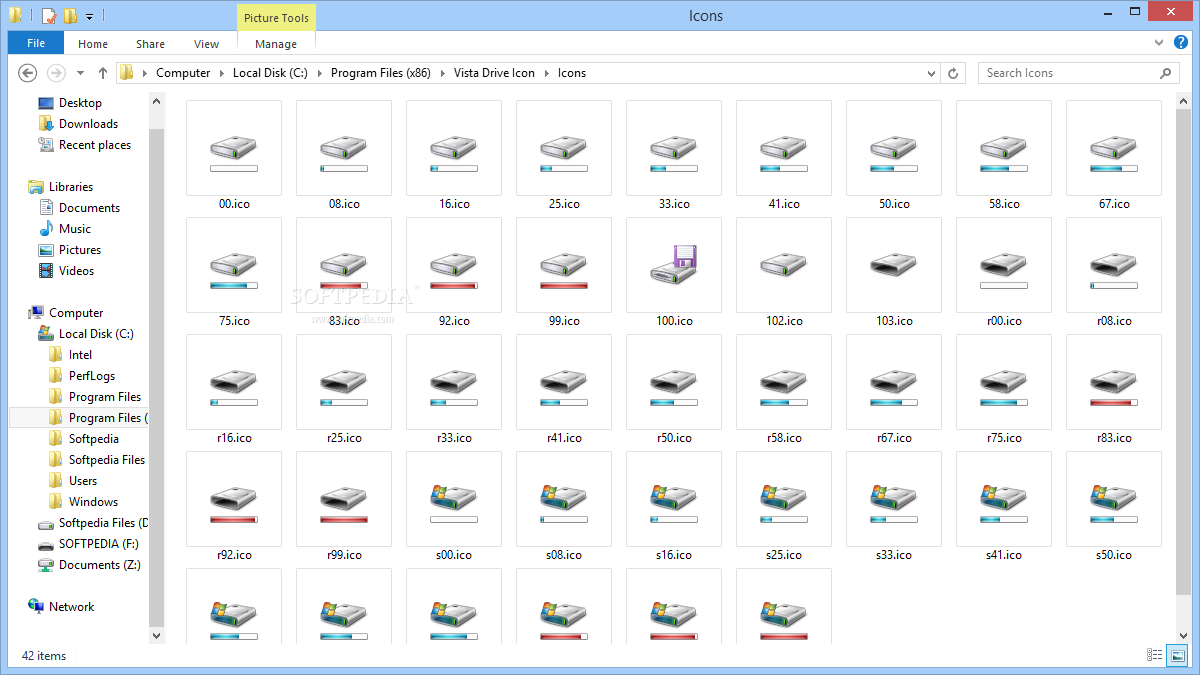
In case you're wondering, these icons bring more than a mere visual improvement as they also show the free space available on each drive. This is done with the help of a bar placed underneath each icon, which displays the occupied space in blue and the available space in white.
Vista Drive Icon replaces the old icons with the new ones automatically, so you just have to run the executable file and that's basically it. As always, it's better to create a restore point or make a backup before playing with the app, just to stay on the safe side.
All things considered, if you want to bring something new and practical in your Windows XP without making changes in vital area of the system, you may want to start by adding Vista's drive icons with this easy to use application.
Vista Drive Icon description
Vista Drive Icon is an application that will change the drive icon shown in Windows "My Computer" to a nearly Vista drive icon.
Vista Drive Icon will also display the drive's free space, so you will always know how much disk space you have available.
What's New in This Release: [ read full changelog ]
Fixed: Missing icon for system drive
Fixed: Application uninstall


 A simple and easy to use software utility designed to help users replace the standard drive icons of their operating system with a Vista-like display
Written by Bogdan Popa on July 3rd, 2012
In case you're still using Windows XP with its default appearance, chances are some interface customizations could come in handy to refresh the looks of this classical operating system.
If the glass and see-through effects don't really appeal to you, there's a more subtle modification you can try by changing the drive icons shown in My Computer. For this purpose you need a dedicated tool to get the job done hassle-free.
Such an application is the one that goes by the name of Vista Drive Icon and will help you replace the traditional drive icons with more modern ones, inspired by the Windows iteration that came right after XP, namely Vista.
In case you're wondering, these icons bring more than a mere visual improvement as they also show the free space available on each drive. This is done with the help of a bar placed underneath each icon, which displays the occupied space in blue and the available space in white.
Vista Drive Icon replaces the old icons with the new ones automatically, so you just have to run the executable file and that's basically it. As always, it's better to create a restore point or make a backup before playing with the app, just to stay on the safe side.
All things considered, if you want to bring something new and practical in your Windows XP without making changes in vital area of the system, you may want to start by adding Vista's drive icons with this easy to use application.
Vista Drive Icon description
Vista Drive Icon is an application that will change the drive icon shown in Windows "My Computer" to a nearly Vista drive icon.
Vista Drive Icon will also display the drive's free space, so you will always know how much disk space you have available.
What's New in This Release: [ read full changelog ]
Fixed: Missing icon for system drive
Fixed: Application uninstall
A simple and easy to use software utility designed to help users replace the standard drive icons of their operating system with a Vista-like display
Written by Bogdan Popa on July 3rd, 2012
In case you're still using Windows XP with its default appearance, chances are some interface customizations could come in handy to refresh the looks of this classical operating system.
If the glass and see-through effects don't really appeal to you, there's a more subtle modification you can try by changing the drive icons shown in My Computer. For this purpose you need a dedicated tool to get the job done hassle-free.
Such an application is the one that goes by the name of Vista Drive Icon and will help you replace the traditional drive icons with more modern ones, inspired by the Windows iteration that came right after XP, namely Vista.
In case you're wondering, these icons bring more than a mere visual improvement as they also show the free space available on each drive. This is done with the help of a bar placed underneath each icon, which displays the occupied space in blue and the available space in white.
Vista Drive Icon replaces the old icons with the new ones automatically, so you just have to run the executable file and that's basically it. As always, it's better to create a restore point or make a backup before playing with the app, just to stay on the safe side.
All things considered, if you want to bring something new and practical in your Windows XP without making changes in vital area of the system, you may want to start by adding Vista's drive icons with this easy to use application.
Vista Drive Icon description
Vista Drive Icon is an application that will change the drive icon shown in Windows "My Computer" to a nearly Vista drive icon.
Vista Drive Icon will also display the drive's free space, so you will always know how much disk space you have available.
What's New in This Release: [ read full changelog ]
Fixed: Missing icon for system drive
Fixed: Application uninstall


